
• Buying Guides
Mini PC vs desktop: which refurbished PC should you buy?
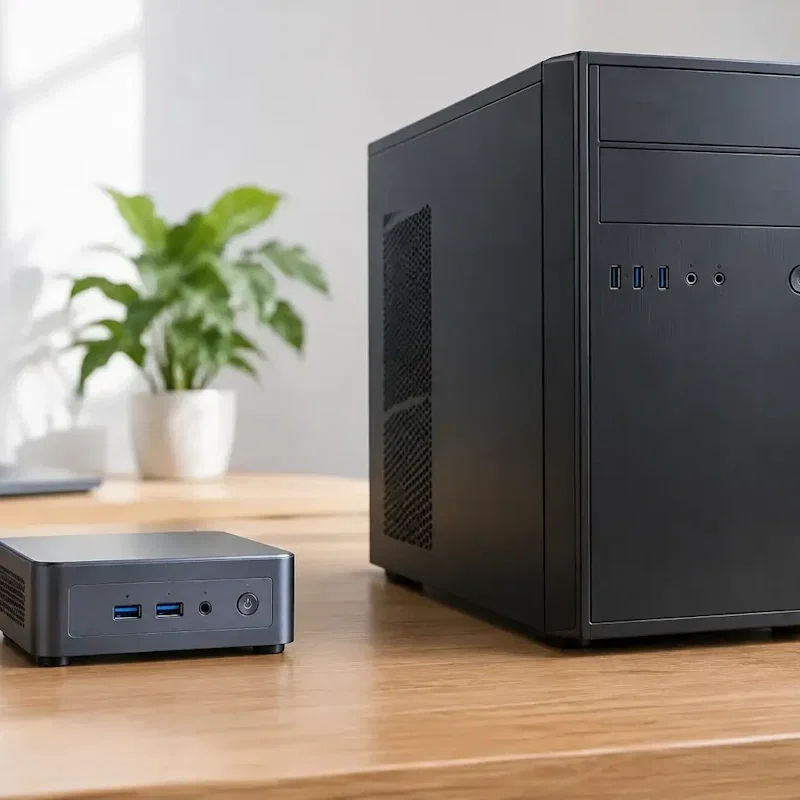
If your computer stays on one desk, a refurbished desktop is often better value than a laptop with similar specs, and you can pair it with a full-size screen and keyboard. For most home offices and shop counters in New Zealand, a mini PC (from $249) or a slim desktop (from $199 for a 6th gen Intel model) is the sweet spot; choose a tower for more upgrade room, or an all-in-one if you want the screen built in. Browse everything in stock in our refurbished desktops collection.
Many of the PCs we sell are ex-lease business machines from HP, Dell and Lenovo, tested and graded here in Frankton, Hamilton. They were designed for office use, which suits a home office, reception counter or small shop.

Written by
Braydon Stone
Why a refurbished desktop still makes sense
If the computer never leaves the desk, a laptop means paying for portability you do not use: a battery, a smaller built-in screen and a hinge. A desktop lets you choose your own monitor, keyboard and mouse and set them up the way you like.
Business desktop ranges such as the HP EliteDesk and ProDesk, Dell OptiPlex and Lenovo ThinkCentre are generally designed to be easy to service. Every machine is tested before it is listed. Our Pristine, Excellent, Good and Acceptable grades describe cosmetic condition only, so a lower grade means more marks, not worse performance than the same model in a higher grade. Performance still depends on the processor, memory and storage, so compare specs as well as grade.
Each desktop comes with a 12-month warranty and 14-day returns. Drives are wiped with certified data-destruction software, and we install a fresh copy of Windows 11 on Intel 6th generation and newer machines. iMacs get a fresh macOS install. Check each listing for what is included in the box. Tracked NZ Post shipping starts from $5.99, or pick up at 4 Devon Road, Frankton, Hamilton.
Mini PC, slim, tower or all-in-one?
Prices below were live on our site at the time of writing. Stock changes quickly, so treat them as a guide.
Mini PCs: small enough to tuck away
Refurbished mini PCs are compact and can often sit behind a monitor or on a shelf. They suit small desks, reception counters and kitchen nooks.
They currently start from $249 for an Intel NUC6i5SYK (Core i5-6260U, 8GB, 128GB). A 128GB drive fills up quickly, so many people will be happier with 256GB, such as the Dell OptiPlex 3070 Mini (Core i3-9100T) or Lenovo ThinkCentre M90n-1 (Core i5-8365U), both from $399.
The trade-off is upgrade space: many minis use laptop-style parts, so adding RAM or storage later can be fiddly. You will also need your own monitor, keyboard and mouse.
Slim desktops: the everyday workhorse
Slim desktop PCs take up far less room than a tower and suit most home offices and small businesses.
Older 4th generation models, such as the HP EliteDesk 800 G1 Slim, start from $125. A 6th generation HP slim (Core i5-6500, 8GB, 256GB) is $199. These are budget options, but check the Windows 11 support note below before choosing a main work PC. The newer Lenovo ThinkCentre M70s Slim (Core i5-10400, 8GB, 256GB) is from $549.
Slim desktops usually have more room than a mini for a later RAM or SSD upgrade.
Tower desktops: room to grow
A tower has space inside for extra drives and later upgrades, which suits heavier work or large photo libraries. Stock is limited; the HP EliteDesk 800 G5 Tower with a Core i9-9900, 16GB and 256GB is $899. For everyday office work, a well-specced slim may do the job for less money and floor space.
All-in-one PCs: the screen is included
All-in-one PCs build the computer into the screen, so you mainly add a keyboard and mouse. They look tidy on a reception desk or kitchen bench.
Windows all-in-ones start from $249 for the HP EliteOne 800 G2 (Core i5-6500, 8GB, 256GB) and HP ProOne 400 G3 (Core i5-7500, 8GB, 256GB). On the Apple side, a 21.5 inch iMac starts from $349 and a 27 inch 5K iMac is $649. Older iMacs may not run the latest macOS, so pick a newer one if you need current apps.
The trade-off: if the screen fails, you are repairing the whole unit rather than swapping a separate monitor.
A note on Windows 11 and older processors
Having Windows 11 installed is not the same as meeting its official hardware requirements. Older processors such as the i5-6500 and i5-7500 are not officially supported. For mainstream Intel Core desktops, 8th generation or newer is a better starting point, but the exact processor and other requirements still matter, including TPM 2.0 and Secure Boot capability. For a main work PC, ask us to confirm official Windows 11 eligibility for the specific machine before buying.
What specs should you look for?
An Intel Core i5 or AMD Ryzen 5 is plenty for email, Office, accounts, browsing and video calls. Newer generations will generally feel snappier and stay usable for longer. Compare the exact processor and generation rather than choosing by the i5 or i7 badge alone. For most office work, enough RAM and an SSD matter too.
8GB of RAM is a practical minimum; 16GB is more comfortable if you run accounting software alongside a busy browser. Most of the machines above have a 256GB SSD.
When a laptop is the better buy
Choose a laptop if you need to take the computer to meetings, lectures, a job site or the couch. If you stay put, a desktop gives you a bigger screen of your choice and no laptop battery to wear down over time.
Why buy refurbished from Regen?
Every desktop is tested in our Frankton, Hamilton workshop and comes with a 12-month warranty and 14-day returns. Grades cover looks only. We have 200+ Google reviews. Tracked NZ Post shipping starts from $5.99, or pick up in store at 4 Devon Road, Frankton, Monday to Friday, 9am to 5pm.
Your refurbished desktop questions answered
A mini PC is the smallest option and can often sit behind a monitor or on a shelf. A slim desktop is a bit larger and usually has more room for extra RAM or a larger SSD later. Both need a separate monitor, keyboard and mouse.
Yes, for mini PCs, slim desktops and towers. You will need a monitor, keyboard and mouse if you do not already have them. An all-in-one has the screen built in. Check each listing for what is included.
We install Windows 11 on Intel 6th generation and newer machines, but installation does not mean official compatibility. Older processors such as the i5-6500 and i5-7500 are not officially supported. Ask us to confirm that the exact PC meets all Windows 11 requirements before buying if official support matters to you.
If the computer stays on the desk, a desktop is often the better value. You can choose your own monitor and keyboard, and you are not paying for portability. Choose a laptop if you need to carry the computer around.
Ready to pick a desktop?
Browse our refurbished desktops, or call us on 07 846 0009 (Mon–Fri, 9am–5pm) and we will help you match a mini, slim, tower or all-in-one to your desk and budget.
Book Your Repair Now