
• Repair Guides
How long does a laptop battery last? (And when to replace it)
Most laptop batteries last around two to four years of regular use before you really notice the drop, but it depends far more on charge cycles, heat and charging habits than on age alone. A battery is generally considered worn once it holds less than about 80% of its original capacity. On a laptop that's otherwise running well, a battery replacement is usually much cheaper than replacing the whole machine.

Written by
Braydon Stone
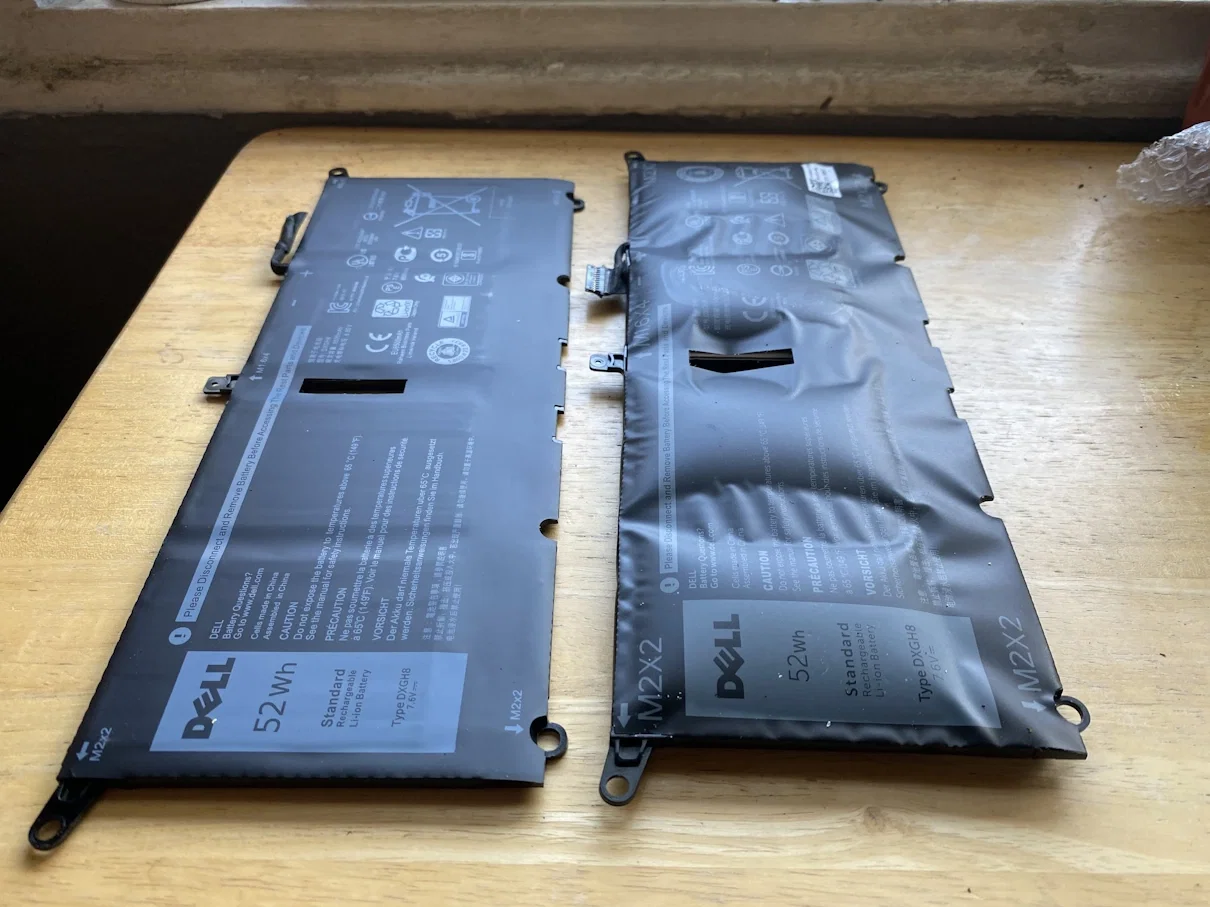
How long does a laptop battery last?
There's no single expiry date. Two laptops bought on the same day can have very different batteries three years later. These three things matter most.
If your laptop used to get through a full day and now needs the charger by lunchtime, you're not imagining it. Every lithium battery slowly loses capacity, and the good news is that it's one of the easiest and most affordable parts to fix. Our computer and laptop repair team in Hamilton sees worn batteries every week, so this is all based on what turns up on our bench in Frankton.
Charge cycles
A charge cycle is using 100% of the battery's capacity, whether that's in one go or spread across a few top-ups. Each cycle wears the battery a little. Apple, for example, rates the batteries in most modern MacBooks for 1,000 charge cycles, and Windows laptop makers publish their own ratings. Someone who runs their laptop flat every day at uni or on the job will get through cycles much faster than someone who mostly uses it on a desk.
Heat
Heat is the biggest enemy of lithium batteries. Gaming, video editing, a laptop sitting on a duvet with its vents blocked, or one left in a hot car over a Waikato summer will all speed up wear. Dust-clogged fans make it worse, because the laptop runs hotter all the time.
Always plugged in at 100%
Sitting at full charge for months on end, especially while the laptop is warm, also ages a battery. This is common with work laptops that never leave the desk. It's not a disaster, but it's why many manufacturers now include charge-limiting settings (more on those below).
How to check your laptop battery health
Before you book a repair or start shopping, it's worth checking what your battery is actually doing.
On Windows
Open Command Prompt, type powercfg /batteryreport and press Enter. Windows saves a battery report file and shows you where it is. Open it and compare the Design capacity with the Full charge capacity. If the full charge capacity is well under 80% of the design capacity, the battery is worn. The report also shows the cycle count on many laptops.
On a MacBook
Go to System Settings, then Battery, and check Battery Health. If it says "Service Recommended", the battery is no longer holding charge like it should. To see the cycle count, hold the Option key, click the Apple menu, choose System Information, then select Power.
Signs your laptop battery needs replacing
It only lasts a fraction of the time it used to
It shuts down suddenly at 20% or 30%
It only works while plugged in
The percentage jumps around or gets stuck
Windows or macOS shows a battery warning
The trackpad is raised, the keyboard is lifting or the case no longer sits flat
That last one matters. A raised trackpad or bulging case usually means a swollen battery. Stop using the laptop, don't try to press it flat, and get it looked at as soon as you can.
Not every battery symptom is the battery's fault, though. A worn charger, a loose charging port or a power setting can look a lot like a dead battery, which is why we test before recommending anything.
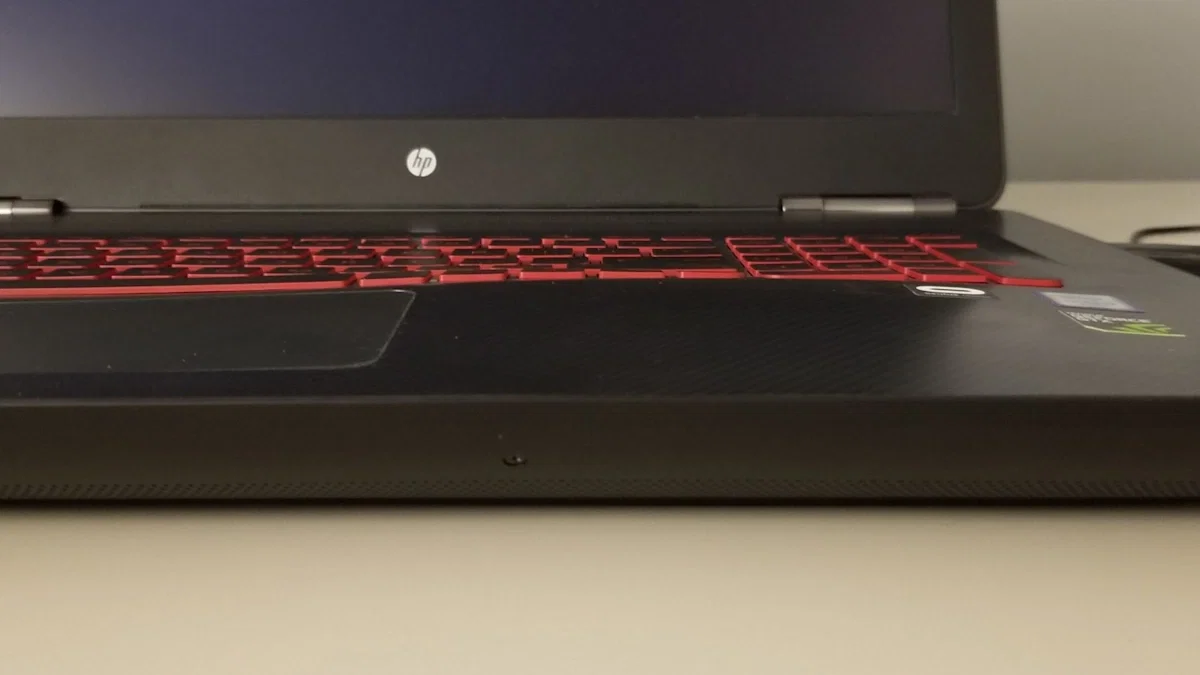
HP Omen Gaming Laptop with swollen battery bulging the top plate.
Battery replacement or a new laptop?
When a new battery makes sense
If the rest of the laptop is fast enough for what you do, the screen and keyboard are fine, and it runs a supported operating system, a new battery is usually the smart move. On our laptop battery replacement page, HP, Dell, Lenovo, Acer and ASUS batteries start from $99, with a 1-3 day turnaround in most cases. Business and gaming laptops need a quote because parts vary by model. For Apple laptops, our MacBook battery replacement starts from $179 for a MacBook Air, with MacBook Pro prices listed by size. Every battery repair comes with a 90-day warranty, and we'll always give you a quote before doing any work.
When it's time for a different laptop
A new battery won't fix a laptop that's slow, can't run Windows 11 or a current version of macOS, or has other faults like a cracked screen and worn keyboard on top of the battery. Once the repair list starts adding up, it often makes more sense to move to a newer machine. A refurbished laptop from Regen comes with at least 80% battery health, a fresh Windows 11 or macOS install and a 12-month warranty, so you're not swapping one tired battery for another. If you're not sure which way to go, ask us and we'll give you an honest answer.
How to make your laptop battery last longer
Use charge limiting if your laptop has it. Lenovo Vantage, Dell's power management software, HP's BIOS battery settings and macOS Optimised Battery Charging can all reduce time spent at 100%.
Keep it cool. Use it on a hard surface, keep the vents clear, and don't leave it in a hot car.
Avoid running it flat all the time. Occasional full discharges are fine, but daily ones add wear.
Use a good charger. A genuine or quality replacement charger matters more than most people think.
Store it at around half charge. If a laptop is going in a drawer for a few months, don't leave it completely flat or full.
Your laptop battery questions answered
Most laptop batteries last around two to four years of regular use before the drop in battery life becomes really noticeable. Heavy daily use, heat and always sitting at 100% can shorten that, while lighter use and good charging habits can stretch it out.
Once a battery holds less than about 80% of its original capacity, it is generally considered worn. Whether you replace it then depends on whether the shorter battery life is a problem for how you use the laptop.
At Regen Computers, HP, Dell, Lenovo, Acer and ASUS laptop batteries start from $99, and MacBook batteries start from $179 for a MacBook Air. Business and gaming laptops need a quote because parts vary by model, and we always quote before doing any work.
Stop using the laptop, unplug it, and do not try to press the case or trackpad back down. Bring it in to be checked as soon as you can so the battery can be removed and replaced safely.
Yes. Every refurbished laptop we sell meets a minimum of 80% battery health, is tested in our Frankton workshop, and comes with a 12-month warranty.
Get your laptop battery checked in Hamilton
Laptop battery not lasting like it used to?
Bring it into Regen Computers at 4 Devon Road, Frankton, Hamilton, Monday to Friday, 9am-5pm. We'll test the battery, charger and charging port, tell you honestly whether it's worth replacing, and quote before any work starts. Battery repairs carry a 90-day warranty, and we have 200+ Google reviews from local customers.
Book a laptop repair in Hamilton or call 07 846 0009.
Book Your Repair Now